
Git
Git is usually already present on Ubuntu. You still need a name, an email, Linux line endings, and a way to authenticate with GitHub that does not store passwords in a plain-text file.
Run everything on this page inside your WSL terminal.
Install or update Git
sudo apt update
sudo apt install -y git
git --version
You also want Git for Windows on the Windows side. It ships Git Credential Manager (GCM), which WSL Git can call so HTTPS credentials live in Windows Credential Manager. If you skipped it in Package Managers:
winget install -e --id Git.Git
During setup, leave Git Credential Manager selected.
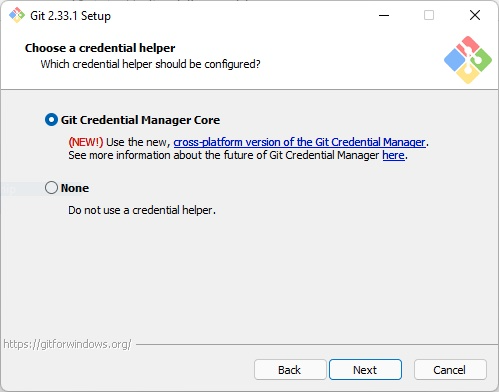
WSL Git and Git for Windows are separate installs. Configure the one you actually run (git inside Ubuntu).
Identity
git config --global user.name "Your Name"
git config --global user.email "you@example.com"
Use the email on your GitHub account, or a GitHub noreply address.
There is no user.username setting. GitHub identity comes from authentication (the next section), not from a fake config key.
Check what you set:
git config --global --list
Line endings
Windows uses CRLF; Linux and GitHub repositories use LF. Inside WSL, convert CRLF to LF on commit and leave files as LF in the working tree:
git config --global core.autocrlf input
That matches GitHub's advice for Linux and macOS. Prefer a committed .gitattributes (for example * text=auto eol=lf) when a repo is opened from both Windows and WSL.
Authentication
Pick one. GCM is the usual choice if Git for Windows is installed. The GitHub CLI is a good alternative. Use SSH if you prefer keys over HTTPS.
Git Credential Manager
GCM is a Windows app. Point WSL Git at the executable Git for Windows installed:
git config --global credential.helper "/mnt/c/Program\ Files/Git/mingw64/bin/git-credential-manager.exe"
On Windows on ARM the binary is under clangarm64 instead of mingw64:
git config --global credential.helper "/mnt/c/Program\ Files/Git/clangarm64/bin/git-credential-manager.exe"
If neither path exists, find it from WSL and reuse that path:
where.exe git-credential-manager.exe
The next git clone or git push over HTTPS opens a Windows sign-in window. Tokens are stored in Windows Credential Manager and shared with Git for Windows.
If you use Azure DevOps:
git config --global credential.https://dev.azure.com.useHttpPath true
GCM reads Git for Windows' config (%UserProfile%\.gitconfig), not WSL's ~/.gitconfig. Proxy settings for GCM belong on the Windows side.
git config --global credential.helper store. That writes credentials to ~/.git-credentials in plain text. Fix the path to git-credential-manager.exe instead, or use gh auth login / SSH.GitHub CLI
gh auth login can store GitHub credentials and configure Git for HTTPS.
Ubuntu's gh package is often months behind and has shipped broken releases. Install from GitHub's apt repository:
(type -p wget >/dev/null || (sudo apt update && sudo apt install wget -y)) \
  && sudo mkdir -p -m 755 /etc/apt/keyrings \
  && out=$(mktemp) && wget -nv -O$out https://cli.github.com/packages/githubcli-archive-keyring.gpg \
  && cat $out | sudo tee /etc/apt/keyrings/githubcli-archive-keyring.gpg > /dev/null \
  && sudo chmod go+r /etc/apt/keyrings/githubcli-archive-keyring.gpg \
  && sudo mkdir -p -m 755 /etc/apt/sources.list.d \
  && echo "deb [arch=$(dpkg --print-architecture) signed-by=/etc/apt/keyrings/githubcli-archive-keyring.gpg] https://cli.github.com/packages stable main" | sudo tee /etc/apt/sources.list.d/github-cli.list > /dev/null \
  && sudo apt update \
  && sudo apt install gh -y
Then:
gh auth login
Choose GitHub.com, HTTPS, and Login with a web browser. When asked whether to authenticate Git with your GitHub credentials, answer yes.
If the device-flow poll errors with slow_down, copy the one-time code, open https://github.com/login/device in your Windows browser yourself, and do not press Enter in the terminal until the browser finishes.
SSH key
GCM and gh HTTPS only cover HTTP remotes. For git@github.com: URLs, create an Ed25519 key:
Generate a key
ssh-keygen -t ed25519 -C "you@example.com"
Press Enter to accept ~/.ssh/id_ed25519 and set a passphrase.
Add it to the agent
eval "$(ssh-agent -s)"
ssh-add ~/.ssh/id_ed25519
Upload the public key
# If you installed gh:
gh ssh-key add ~/.ssh/id_ed25519.pub --title "WSL"

# Or copy it and paste at https://github.com/settings/keys
cat ~/.ssh/id_ed25519.pub
Test
ssh -T git@github.com
See GitHub's SSH key guide for the full flow.